Every long-lived React codebase ends up in the same place: hundreds of components, dozens of routes, and nobody quite sure which <Thing/> is still used by which page anymore. Knip will tell you about unused exports. Madge will draw you a file graph. Bundle analyzers count bytes. None of them answer the question that actually matters in a code review:
“Is this component still rendered by any page in the app?”
So I built react-xray — a static analyzer CLI that produces a per-page → component reachability matrix, two flavors of unused-component report, and a tally of how much you actually use each third-party UI library. The output is one self-contained HTML file you can drop straight into a PR.
It’s open source, MIT-licensed, and lives on npm as @chintandiwakar1/react-xray.
Table of contents
Open Table of contents
The Gap Between Existing Tools
I’ve used all of these and they’re great at what they do — but none of them answer the page-reachability question:
| Tool | What it does | Gap react-xray fills |
|---|---|---|
knip | Unused exports at the file level | Doesn’t tell you which components are rendered by which pages |
madge | File-level dependency graph | No concept of pages, components, or external library adoption |
react-scanner | Counts JSX render sites | No definitions, no pages, no reachability |
| Bundle analyzers | Bytes per chunk | Component-blind |
A component can be exported, imported, and still never end up on screen — because the only file that imports it is itself unreachable from any page. That’s the case I care about, and it’s the one that’s hardest to catch by eye.
Install and Run
Zero config on Next.js projects:
# one-shot run, no install
npx @chintandiwakar1/react-xray

# or globally
npm install -g @chintandiwakar1/react-xray
react-xray
Point it at any React/Next.js project and three things happen:
- A terminal summary prints (tokei-style table).
react-xray-report.jsonis written — full machine-readable scan result.react-xray-report.htmlis written — one self-contained file, dropable into a PR.
Sample terminal output
react-xray v0.0.2   /path/to/your-app   next-app   scanned 1781 files in 2.66s

┌─────────────────────┬───────┬────────┬─────────┬───────────┐
│ Language            │ Files │ Lines  │ Code    │ Comments  │
├─────────────────────┼───────┼────────┼─────────┼───────────┤
│ TypeScript (.tsx)   │  1387 │ 382863 │  345817 │     14978 │
│ TypeScript (.ts)    │   384 │  32449 │   29819 │       892 │
│ JavaScript          │     6 │    308 │     295 │         4 │
├─────────────────────┼───────┼────────┼─────────┼───────────┤
│ Total               │       │ 415669 │         │     15874 │
└─────────────────────┴───────┴────────┴─────────┴───────────┘

Components       1494 (used 1234 · unused 260)
Pages            252
External usage   406 packages, 6332 instances

⚠  Top unused
   UserProvider           src/contexts/UserContext.tsx           26 LOC
   InvoiceTransactions    src/components/invoice-transactions.tsx  858 LOC
   LeadContactInfoComponent  src/components/lead-contact-info.tsx  18 LOC
   … 257 more — see report.html or report.json
That “858 LOC of unused code” line is the kind of finding that pays for the tool the first time you run it.
Two Kinds of Unused
react-xray distinguishes two failure modes, because they have different fixes:
| Report | What it catches |
|---|---|
| Strictly unused | Component is defined but no <JSXTag/> anywhere in the project renders it |
| Unreachable | Component’s file isn’t reached by BFS from any page — catches orphan subtrees that import each other but no page imports them |
The second case is the one tools usually miss. A component can look “used” because something imports it — but that something is itself an orphan. react-xray walks the file-level import graph from every page and flags anything BFS doesn’t visit.
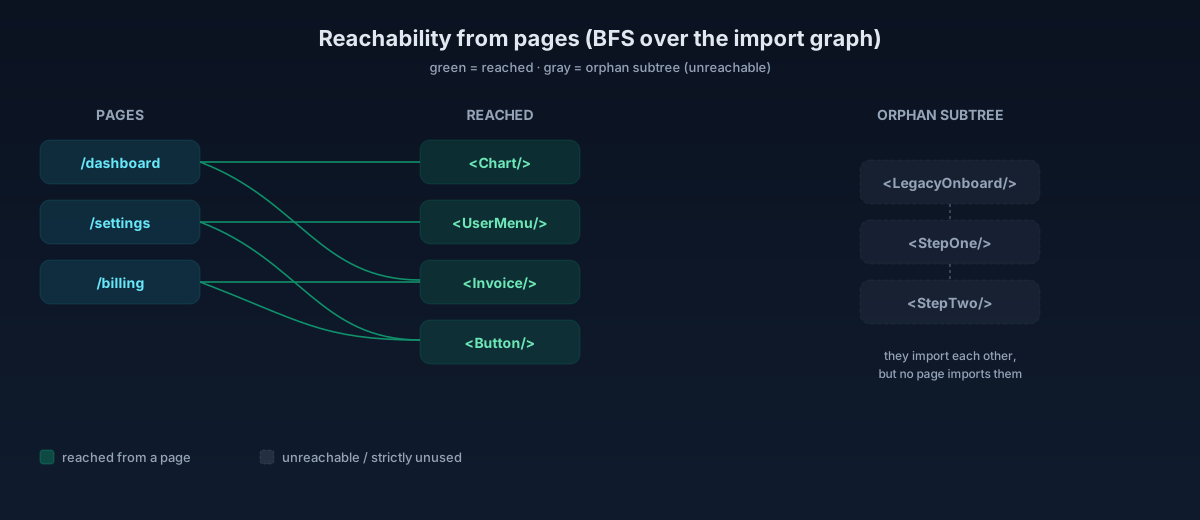
Every finding ships with a reasons[] array — concrete facts like “no JSX usage in project” or “file not reached by BFS from any page”. No opaque confidence scores. You decide.
How It Works
Six stages. Each stage is a pure function emitting a plain object, so every stage is independently testable and the whole thing is roughly as fast as tsc --noEmit:
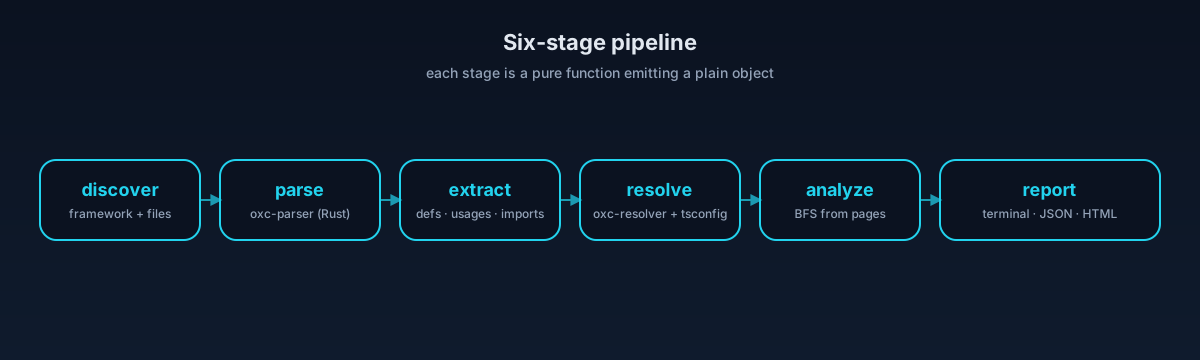
- discover — framework detection (App Router, Pages Router, mixed, with or without
src/), file collection that respects.gitignore. - parse —
oxc-parser(Rust-native, ~3× faster than swc for this workload). AST cached by content hash, so re-runs only re-parse changed files. - extract — a single AST walk emits
ComponentDef,JSXUsage, andImportEdgerecords. - resolve —
oxc-resolverhandles tsconfig paths, monorepo references, exports maps. - analyze — file-level graph, BFS reachability from pages, unused lists, LOC stats.
- report — terminal table, JSON, single-file HTML (auto split-to-sidecar over 10 MB).
Why the graph is file-level, not component-level
This was the most important design call. A page transitively renders things it never directly imports — children, slot props, as-prop rendering, render-prop callbacks. Trying to build a true component-render graph in a static analyzer gives you a graph that’s wrong with confidence.
A file-level import graph is conservative in the right direction: if a file is reached, anything it exports could render. If a file is unreached, nothing in it can render. That’s the strong claim the unused report leans on.
What It Detects
- Frameworks: Next.js App Router, Pages Router, mixed setups, with or without the
src/directory layout. - Pages: Real route files plus reachability roots (
layout,template,error,not-found,loading,default,global-error).route.tsandapi/**excluded. - Components: function declarations, arrow consts, class components extending
React.Component, default exports, and factory patterns (styled.button,forwardRef,memo,lazy,createIcon, …). - JSX usage: plain
<Foo/>, compound<Card.Header/>, and polymorphic<Box as={Custom}/>. - Imports: static, re-exports, dynamic with literal specifiers, and
React.lazy(() => import('...')). - External components: every JSX element resolved to a
node_modulespackage — grouped by{ package, name }with instance counts. Now you know whether you’re using 4 components out of shadcn/ui or 40.
The Bits That Got Hard
Two things ate disproportionate time:
1. Distinguishing components from PascalCase non-component consts. Code like const Inter = localFont(...), const QuerySchema = z.object(...), or const Body = cva(...) looks exactly like a component definition. v0.0.1 flagged hundreds of these as “unused components.” v0.0.2 ships with a denylist of factory callees that produce non-component values, plus a heuristic that components are functions whose body returns JSX or a React.createElement(...). False positives went from “annoying” to “rare.”
2. Resolving bare specifiers on projects without node_modules/. Initially, if you ran react-xray in a fresh clone, react, next/link, and friends came back as unresolved, and the external-library tally was empty. Now uninstalled bare specifiers are classified as external so library-adoption tracking works on CI runners and clean checkouts.
Caveats — Worth Being Honest About
Static analysis of a dynamic language has limits, and I’d rather you know them upfront than discover them mid-review:
- MDX is out of scope for v0.
- Polymorphic identifiers (
const Comp = map[key]; <Comp/>) are invisible to a static analyzer. Logged as a warning, not followed. - Dynamic imports with non-literal specifiers (
import(variable)): same — logged, not followed. asprop: the target identifier is recorded as a polymorphic usage warning so it doesn’t silently flag the target as unused, but it’s still a heuristic.- Expect some false positives in the unused report on apps with heavy barrel re-exports or HOC chains. Treat the high-LOC findings as the highest-value place to start.
When to Reach for It
- Before a big refactor. Know what’s actually rendered before you start moving things.
- In code review. Drop the HTML report into a PR description — reviewers can spot a 600-LOC component that the diff thought it was wiring up but no page actually reaches.
- Onboarding a new codebase. A “where do pages live and which components do they pull in” map is the fastest way to build a mental model.
- Library audits. “Are we actually using radix-ui or did we copy two components?”
What’s Next
v0 covers Next.js (App Router, Pages Router, both with or without src/). Coming next:
- Remix and React Router auto-detect
- Orphan-subtree visualization in the HTML report
- Prop usage tracking (which props of
<Button/>are actually used) - Monorepo / multi-tsconfig support
- Plugin API for custom component-definition patterns
Try It
npx @chintandiwakar1/react-xrayThat’s the whole onboarding. No config, no API key, no account.
If you find a component it falsely flags as unused, please open an issue with the snippet — false-positive reports are the most valuable kind of feedback this tool can get right now.